 teamagogo
Teamagogo vs Clover's built-in team tools
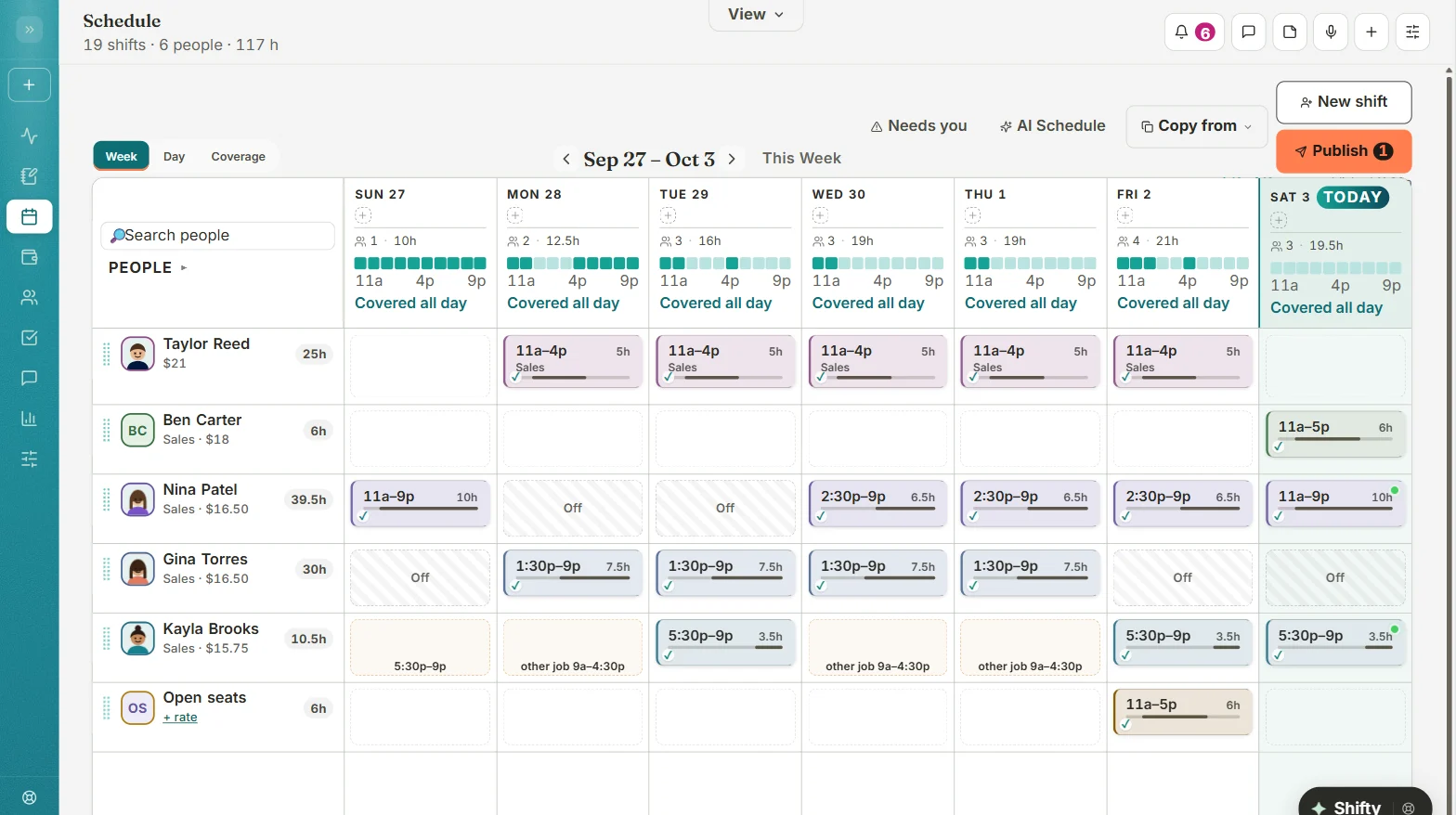
A Clover register already records clock-ins with its Shifts app, and Clover's scheduling, timesheets and team messaging are powered by Homebase. If everyone clocks in at the register and you run Clover Payroll, that is a tidy setup. Teamagogo is for the owner who wants checklists, tip pooling, a manager log and AI scheduling included, and still wants Clover's sales next to the schedule.
Which one fits you.
Clover: the time clock and scheduling built into a Clover register, powered by Homebase. We'd rather you pick the right tool than the wrong one from us.
Pick Clover's built-in tools if…
- You want everyone to clock in on the Clover register itself, and nowhere else. The Shifts app and the Homebase time clock both do that.
- You run Clover Payroll by ADP and want approved hours to flow straight into it.
- You have 10 people or fewer at one location and only need a schedule, a time clock and messaging. Homebase's free plan covers that.
- You want everything inside Clover, with no second login.
Pick Teamagogo if…
- You want task lists, tip pooling and the manager log included. On Homebase's price list, task lists and tip pooling are paid add-ons.
- You want AI scheduling on the free plan, with the reason for every pick.
- You want Clover's sales next to your schedule: Teamagogo connects to Clover for sales by hour, labor cost against sales and card tips.
- Your team speaks more than one language and you want messages translated for each reader.
- You'd like to read the price before you call anyone.
What Clover charges.
Clover's site gives no price for its Homebase-powered scheduling and time clock. Read on Clover's and Homebase's own websites on November 26, 2026. Prices change, so check their page before you decide.
- Records clock-in, clock-out and shift length
- Each person needs an employee profile
- Clover's Starter plan allows three employees, the owner included
- Scheduling, availability and time-off requests
- Time clock on the Clover device or a phone
- Timesheets, break and overtime alerts
- Team messaging and shift reminders
- Homebase's own free plan
- The Time Clock by Homebase app is preinstalled on new Clover devices
- Connecting Clover to Homebase is free
- Task Manager add-on: $13 a month
- Tip Manager add-on: $25 a month
- See our Homebase comparison for every plan
We can't do the math for you here.
Clover's site doesn't give a price for its Homebase-powered scheduling and time clock, so there is nothing of Clover's to add up. If you use Homebase's own plans on your Clover, our Homebase comparison works out a month. Ask Clover what your plan includes, then set it beside our pricing.
Teamagogo vs Clover, feature by feature.
Every Teamagogo line is live in the app today. Every Clover line comes from the numbered source beside it.
| What you need | Teamagogo | Clover | Source |
|---|---|---|---|
| Price | |||
| Pricing model | Per locationNot per person. Billed on the people who clocked in that month, never your whole list. No add-ons. | Not on their siteClover doesn't publish a price for these tools. Homebase's own plans are per location, with add-ons | [5] |
| Free plan | Basic is freeUp to 10 people at a location. No card needed, no time limit. | Homebase BasicOne location, up to 10 employees, on Homebase's own price list | [6] |
| Contract | No card needed to startBasic is free for up to 10 people at a location, with no time limit. | Not statedFor the team tools; it depends on your Clover agreement | [1] |
| Scheduling | |||
| Employee scheduling | IncludedBuild the week on a computer or a phone, copy last week, post open shifts, see coverage hour by hour. | YesAvailability, time-off requests and shift changes, powered by Homebase | [1] |
| AI scheduling | Shifty, on both plansDrafts the week and gives the reason for every pick. You choose how far it goes: suggest, draft, or send the week itself. | Not on their siteNot on Clover's site. Homebase lists an AI Scheduling Assistant from its Plus plan, $70 a month per location | [5] |
| Shift swaps and cover | IncludedSwap and cover requests you approve. Find cover ranks who is free and qualified. | YesClover lists shift changes; Homebase lists trades and covers on all plans | [1] |
| Time off | IncludedApprove the whole request or only the days that work. | YesTime-off requests | [1] |
| Time clock and timesheets | |||
| Time clock | IncludedPhone clock-in at a geofenced spot, optional photo, a shared tablet with PINs, and punches that save with no signal. | On the Clover registerThe Shifts app, or the Homebase time clock on the Clover device or a phone. On Homebase's price list, GPS and photo clock-in start on a paid plan | [1] |
| Timesheets | Included, history keptProblems flagged with a one-tap fix, weekly sign-off by each person, and the original punch is never overwritten. | YesReview, edit and approve hours in Clover; Homebase's free plan stores timesheets for 90 days | [6] |
| Break and overtime rules | IncludedMeal and rest break rules for California and 11 other states, with California meal waivers and premiums, and overtime warnings. | AlertsAlerts for overtime, breaks and time off; state break rules are not on Clover's site | [1] |
| Team | |||
| Team chat | IncludedTeam chat, direct messages and announcements people tap to say they've read. | YesReal-time messaging and shift reminders on an employee app | [1] |
| Languages and translation | IncludedFive languages, picked by each person. What people write is translated for each reader, with a See original link. | Not on their siteWe looked for automatic translation of team messages | [1] |
| Task lists and checklists | IncludedOpening and closing checklists, recurring duties and photo proof. | Add-onNot on Clover's site. Homebase sells Task Manager at $13 a month per location | [5] |
| Manager log | IncludedOne line per fact. Late arrivals and missed shifts are written in for you. | Not on their siteNot on Clover's site. Homebase has one; see our Homebase comparison | [1] |
| Recognition | IncludedShout-outs, points you control, rewards you choose and Employee of the Week. | Not on their siteNot on Clover's site. Homebase lists shout-outs on its free plan | [6] |
| Money | |||
| Tip pooling | IncludedEnter the day's pooled tips, or bring card tips in from your register, and split them by hours worked. | Add-onNot on Clover's site. Homebase sells Tip Manager at $25 a month per location | [5] |
| Sales and labor costs | IncludedConnect Clover, Square, Toast or Shopify POS to see sales by hour and labor cost against sales. | YesLabor costs side by side with sales | [2] |
| Payroll | Keep your payroll companyExport files built for ADP RUN, Gusto, QuickBooks Online and Paychex Flex. We don't sell payroll. | Sells its ownClover Payroll by ADP; approved hours flow into it | [2] |
| Who sees pay | 50 permissionsYou decide who sees pay rates, totals and timesheets. | YesOne employee profile holds register access and permissions | [2] |
| Getting help | |||
| Phone apps | Installs from our websiteA home-screen app with its own icon and alerts on iPhone and Android. Not in the App Store or Google Play yet. | An employee appClover says team messaging runs on an employee-facing app | [1] |
| Support | Your own real person to contactCall 888-515-TEAM on both plans and our assistant puts you through to your contact or takes a message. Or email, or write to us from Help inside the app. | Around the clockClover says it is available 24/7/365 for troubleshooting and support | [7] |
Where each one is strong.
What Clover does well
- Clock-in right on the Clover register
- Approved hours flow into Clover Payroll by ADP
- No second login: it lives inside Clover
- A free Homebase plan for one small location
What Teamagogo doesn't do yet
- No App Store or Google Play download yet. The app installs from our website.
- Overnight shifts that cross midnight aren't supported yet.
- Reports that add several locations together aren't built yet.
- We don't run payroll. We hand clean hours to the payroll company you use.
Adding Teamagogo beside your Clover register.
You keep Clover for sales. Nothing changes on the register. If your hours so far are in Homebase, download your timesheets from Homebase first; our Homebase guide covers bringing them in.
Create your account
Create your Teamagogo account. No card, and it takes about ten minutes.
Add your team
Add your team: type names and mobile numbers, or share one join link or QR code. They install the app from the link onto their home screen.
Connect Clover
Connect Clover from Integrations, any time you like, to see sales by hour, labor cost against sales and card tips.
Send your first week
Build next week, or let Shifty draft it, and press Send. Decide where people clock in, the Clover register or Teamagogo, so hours are never counted twice.
Teamagogo vs Clover: questions owners ask.
Does Clover have a built-in time clock?
Yes. Clover's help center says the Shifts app records when employees clock in and out and how long each shift was. Clover also offers a Time Clock app powered by Homebase, with breaks and overtime.
Does Clover do employee scheduling?
Yes, through Homebase. Clover's site says its team scheduling and attendance tools are powered by Homebase. It doesn't give a price, so ask Clover what your plan includes.
Can I use Teamagogo and keep Clover?
Yes. You keep your Clover register. Teamagogo connects to Clover to show sales by hour, labor cost against sales and card tips next to your schedule.
Is this the same as your Homebase comparison?
Mostly, for scheduling. Clover's scheduling is Homebase's, so Teamagogo vs Homebase has the plan-by-plan detail. This page adds what is particular to Clover: the Shifts app, clocking in at the register and Clover Payroll.
Where every Clover fact came from.
Read on Clover's and Homebase's own websites on . Found something out of date? Tell us and we'll fix it.
- Clover Time and Attendance: https://www.clover.com/pos-systems/employees/m/time-and-attendance
- Clover employee management: https://www.clover.com/pos-systems/employees/m/employee-management
- Clover help: clock in and out with the Shifts app: https://www.clover.com/en-US/help/set-up-login-methods-for-shift-workers
- Homebase: Clover integration: https://www.joinhomebase.com/integrations/clover
- Homebase pricing: https://www.joinhomebase.com/pricing
- Homebase free plan: https://www.joinhomebase.com/free
- Clover pricing: https://www.clover.com/pricing
Clover is a trademark of its owner. Teamagogo is not affiliated with Clover.
Try it with your own team.
Basic is free for up to 10 people at a location. No card needed to start.