 teamagogo
Everything a shift business runs on, in one app.
Employee scheduling, time clock, timesheets, shift swaps, team communication, tasks, tips and payroll export, sales and labor costs, and recognition. One price per location. No add-ons.
Screens on this page are real Teamagogo screens or examples drawn from them. The people and the store are examples.
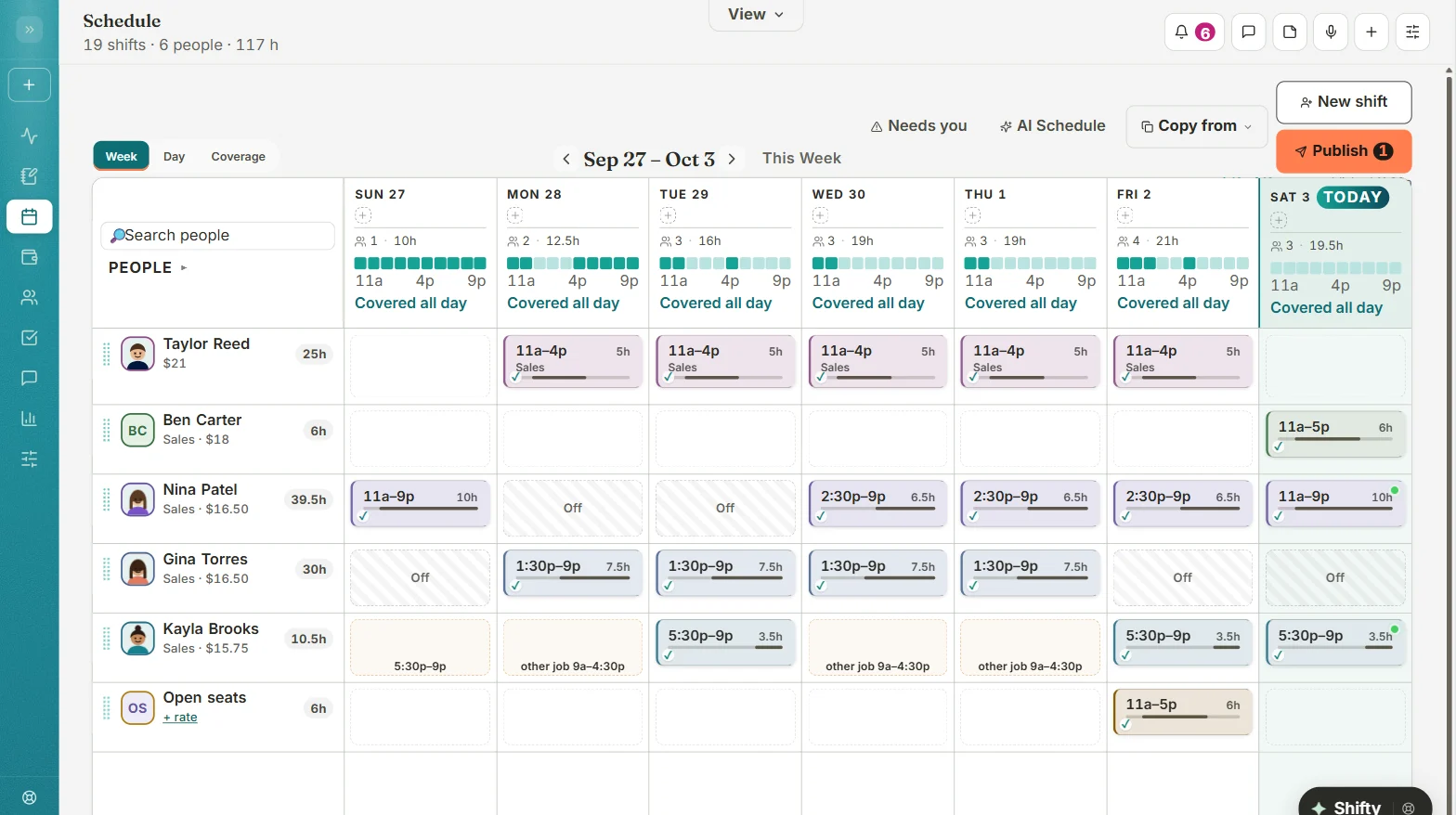
Build next week's schedule from who's free.
Build the employee schedule in minutes on a computer or a phone, or have it drafted for you.
- Build it your way. Drag shifts on the computer, tap them in on your phone, copy last week or a week before it, or start from a template.
- See coverage before anyone else sees anything. Hour by hour, against the minimum you set, with the week's hours and labor cost as you go.
- Open shifts your team can claim, and availability each person keeps up to date themselves.
- Warnings before you send: overtime, thin coverage, a missing certification.
- Closed days and holidays marked on the schedule, so nobody is put on a day you're shut.
- Send once. Only the people whose shifts changed get an alert, and you get a moment to undo.
- Bring a schedule in from a spreadsheet or a photo of the one on the wall. It lands as a draft.
- A calendar link puts each person's shifts in Google, Apple or Outlook calendar.
A time clock that fits how your business works.
Clock in from a phone, or from a shared tablet by the back door. You choose the rules.
- Phone clock-in at a clock-in spot you set by address or by dropping a pin. Punches from outside it are flagged, or stopped if you prefer.
- An optional photo at clock-in, so you can see who really clocked in.
- A shared tablet with PINs for teams that don't clock in on their own phones.
- No signal? The punch still saves with the time they tapped, and goes through when the phone is back online.
- Early and late rules for the whole location, a group or one person: allow it, ask why, or stop it.
- Forgot to clock out? A reminder first, then an automatic clock-out you can reopen, if you turn it on.
- A map of where clock-ins happened, and an alert when someone scheduled hasn't shown.
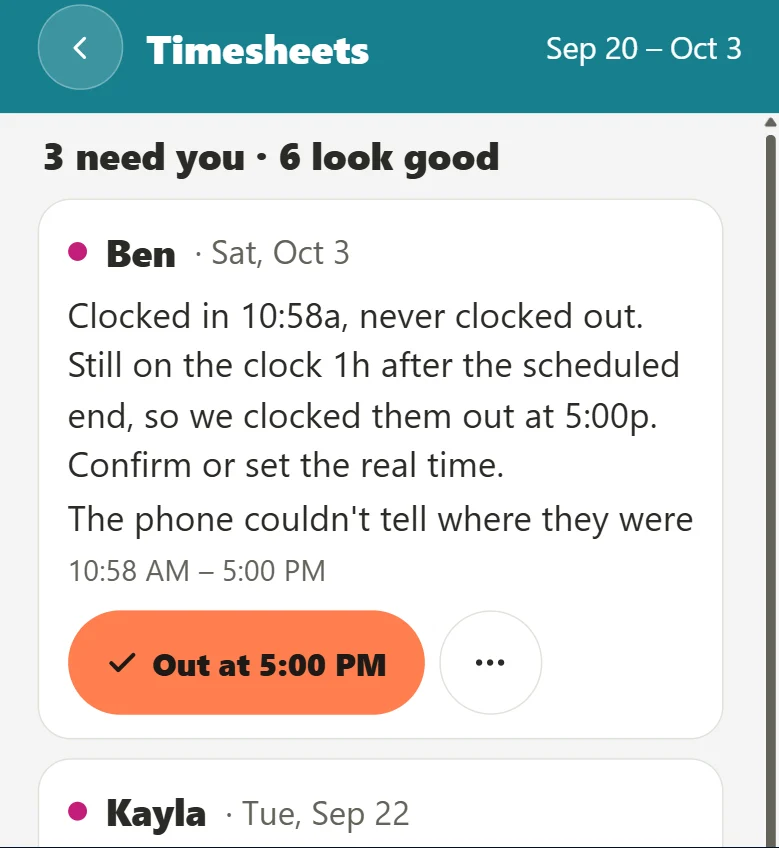
Timesheets that find their own problems.
Friday afternoon shouldn't be for hunting missed punches. The timesheet points at what's wrong and offers the fix.
- Missed clock-outs, long shifts with no break, overtime creeping up: flagged in plain words, each with a one-tap fix.
- Each person signs off their week on their phone, or tells you what's wrong, before payroll.
- The original punch is never overwritten. Every edit keeps who changed it, when and why.
- Meal and rest break rules for California and 11 other states, with California meal waivers and premiums. Paid or unpaid meals: your call.
- Overtime the way your state counts it: weekly, plus California's daily and double-time rules.
- Pay periods that match your payroll, and pay rates that are saved at clock-in so a raise never rewrites last week.
Swaps and time off, with you in the loop.
No more finding out about a swap after it happened.
- "Can't make it?" becomes a swap or a cover request. The shift stays theirs until you approve.
- Find cover ranks who is free, qualified and not near overtime. The first yes wins.
- Time-off requests you can approve whole, or just the days that work.
- Time-off balances you enter or bring from your old app, shown to whoever approves.
- Availability in plain words, like "every other weekend" or "classes Monday and Wednesday nights".
One place to talk, and one place to remember.
Team chat that belongs to the business, not to whoever started the group text.
- Team chat, channels and direct messages, with tools for a manager to moderate.
- Announcements people tap to say they've read. See who hasn't, and nudge them. Add a quick poll when you need an answer.
- Auto-translate: each person reads in their own language, with a See original link. It covers chat, announcements, shift notes, the manager log and the Library.
- Shift notes for whoever's on next, typed or spoken.
- The manager log keeps one line per fact. Late arrivals, call-outs and missed shifts are written in for you.
- The Library holds the documents your team should read, and shows who has.
Opening and closing, done and proven.
The list on the clipboard, on everyone's phone, with a record of what got done.
- Opening and closing checklists that reset every day.
- Recurring duties on the days you choose: deep-clean Tuesdays, inventory on the 1st.
- Photo proof where you want it: the walk-in temperature, the locked back door.
- One-off tasks assigned to a person, with a due time.
- Forms you build for the things you collect: incident reports, equipment checks.
- Certifications, such as an alcohol server card, with a warning before you schedule someone whose card is missing or expired.
Keep your payroll company. Hand it clean hours.
We don't sell payroll. We get the hours and tips right, then hand them over in the file your payroll company expects.
- Export files built for ADP RUN, Gusto, QuickBooks Online and Paychex Flex. Upload them the way you do today.
- Tip pooling: enter the day's pooled tips, or bring card tips in from your register, and split them by hours worked.
- Tip shares you set per person, and each person sees their own tips with their hours.
- Pay periods close cleanly. A fix after payday rolls into the next export.
- Hourly or salary, a rate per person, and a different rate for a single shift when you need it.
- Pay stays private. Only the people you choose see rates and totals.
See when you sell, and staff to it.
Connect your register and the schedule stops being a guess.
- Connect Clover, Square, Toast or Shopify POS. Sales and card tips come in on their own.
- When you sell: a week-by-hour picture of your busy and quiet stretches, with a spreadsheet download.
- When to staff: the people each hour calls for, set beside who's scheduled, with short and extra stretches marked.
- Labor cost against sales, so you know what a week of shifts costs before and after it happens.
- A weekly labor budget on the schedule that fills as you add shifts.
- Sales numbers stay private to the people you give the money permission to.
Lightspeed, SpotOn, Revel and TouchBistro are Coming
People stay where their work gets noticed.
Most scheduling apps stop at the schedule. Teamagogo makes thanks part of the workday.
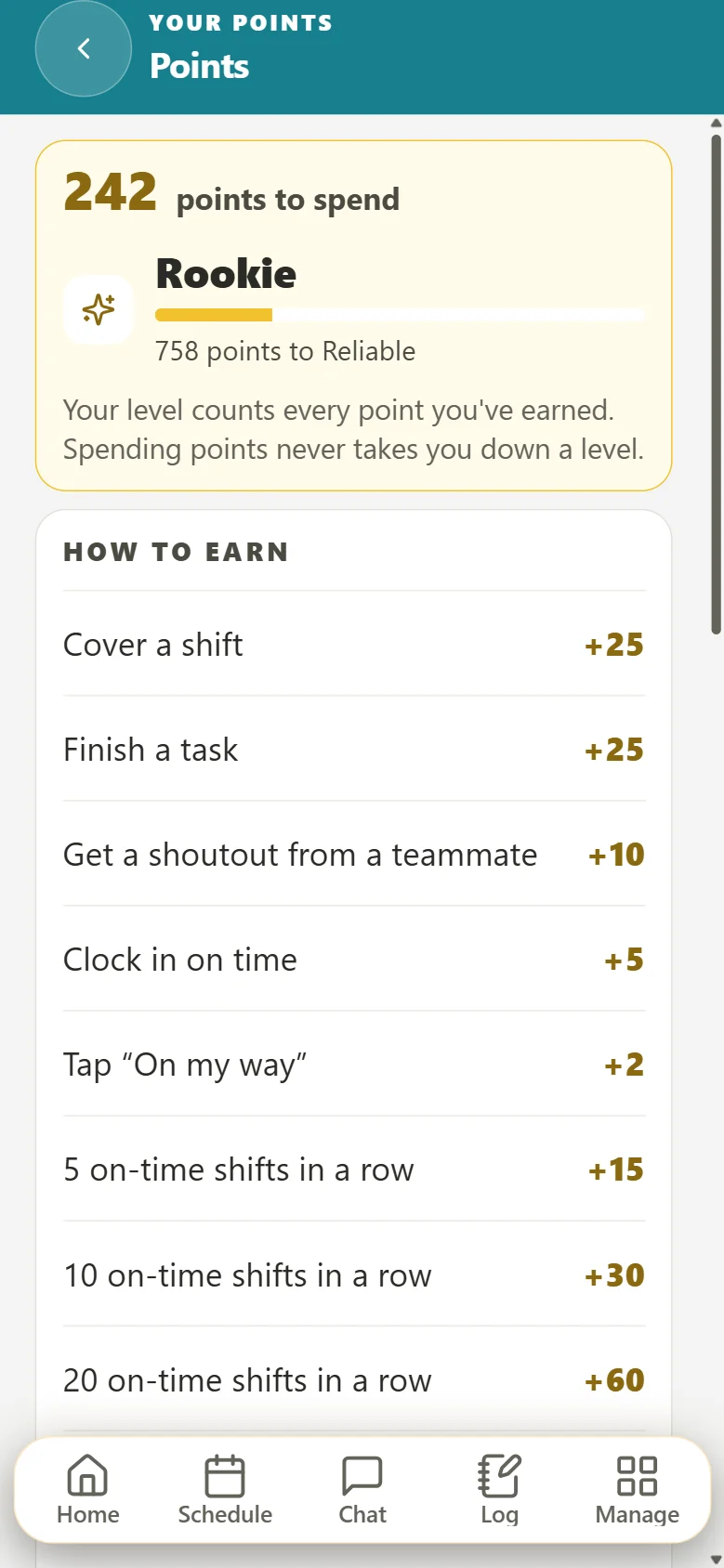
- Shout-outs from anyone to a teammate or the whole team. They land on the phone in gold.
- Points you control. You decide what earns them, such as covering a shift or an on-time streak. Points are never taken away.
- Rewards you choose, from a free shift meal to a paid day off.
- Employee of the Week: pick someone, or let the shout-outs pick.
- Reviews, write-ups and training kept with each person's record, for the conversations that need one.
AI scheduling that shows its work.
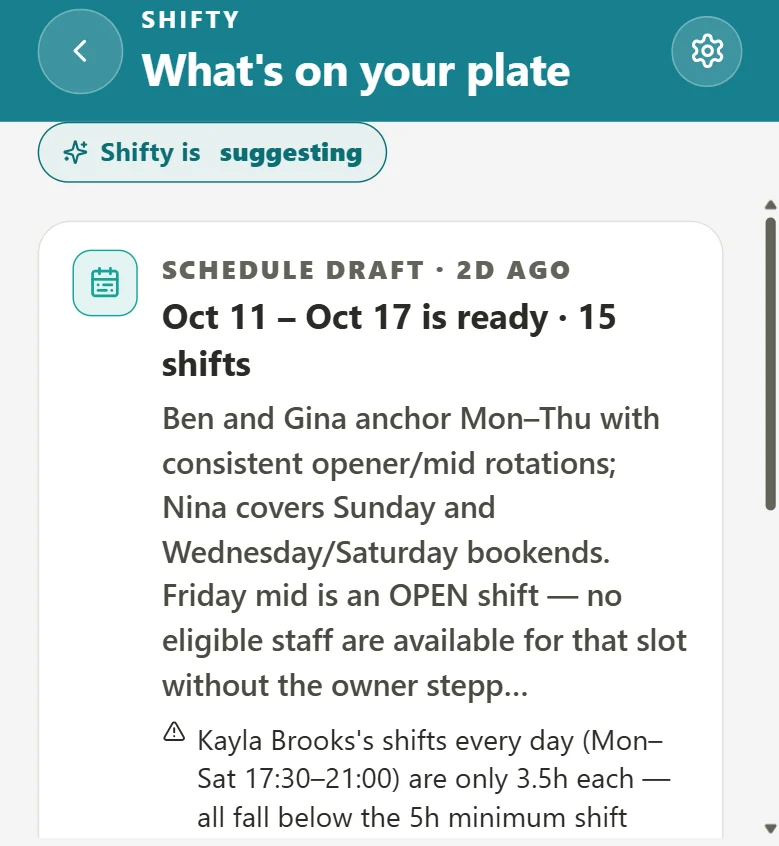
Shifty is the assistant inside Teamagogo. Ask it in plain words, in any of five languages. You decide how far it goes.
- It drafts the week around availability, overtime, your rules and, with a register connected, your sales.
- It gives the reason for every pick: who's available, who's near overtime, who's trained for it.
- You set how far it goes: suggestions only, drafts you send yourself, or the week built on the day you choose and sent on its own when nothing breaks your rules.
- Pay stays in your hands. Fixes to hours, breaks or pay rates are always proposals you confirm.
- Your team can ask too: "When do I work next week?"
The parts you only notice when they're missing.
Five languages
English, Spanish, Portuguese, Simplified Chinese and Vietnamese. Each person picks their own, on the phone and on the computer.
50 permissions
Owner, manager and employee roles to start from, then decide exactly who sees pay rates, totals, timesheets and sales.
More than one location
One login switches between your locations. Each has its own schedule, clock rules and team.
Set up for your kind of business
Start from a setup for a restaurant, café, bar or retail shop in your state, then change anything.
Records kept right
Hours are corrected or voided, never deleted. Each week is signed by the person who worked it.
Alerts that reach people
Phone alerts from the installed app, and email. Only the people a change affects are told.
Works with what you use
Sales and card tips from Clover, Square, Toast or Shopify POS. Hours out to ADP RUN, Gusto, QuickBooks Online or Paychex Flex.
Your data, protected
How we protect your business's and your team's information.
Security →See how it fits your business.
Restaurants, cafés, retail and more
What matters most for your kind of business.
Who it's for → CompareTeamagogo next to 12 other tools
Prices from their own sites, and who should pick which.
All comparisons → Setting upUp and running this afternoon
The steps, and how to bring your team and hours from another app.
Setting up →Questions about what's included.
Is everything on this page included?
Yes. Scheduling, the time clock, timesheets, swaps and time off, chat, tasks, tip pooling, payroll export files, sales reports and recognition are part of both plans. There are no add-ons. The one difference between the plans is whether Shifty sends the schedule on its own. See pricing
Does it work on a phone and a computer?
Both. Owners and managers work from a phone or a computer. The team uses the phone app, which installs from our website onto the home screen of any iPhone or Android phone. There is no App Store download yet.
Which registers does it connect to?
Clover, Square, Toast and Shopify POS today. With no register connected, everything else still works, and you enter pooled tips by hand.
Which languages does it come in?
English, Spanish, Portuguese, Simplified Chinese and Vietnamese. Each person picks their own, on every screen, and what people write is translated for each reader.
What isn't built yet?
App Store and Google Play apps, overnight shifts that cross midnight, reports that add several locations together, and text-message alerts for shifts. They're listed on What's coming.
Set up your store this afternoon.
Basic is free for up to 10 people at a location. No card needed to start.