Teamagogo vs HotSchedules

The HotSchedules alternative built for the independent owner.

HotSchedules runs 120,000 locations for chains like Taco Bell and Dunkin'. To see a price, you book a demo. Teamagogo is built for the owner who works the floor: build the week from your phone, keep your payroll company, and skip the sales call.

No contractNo card to startFree for up to 10 people
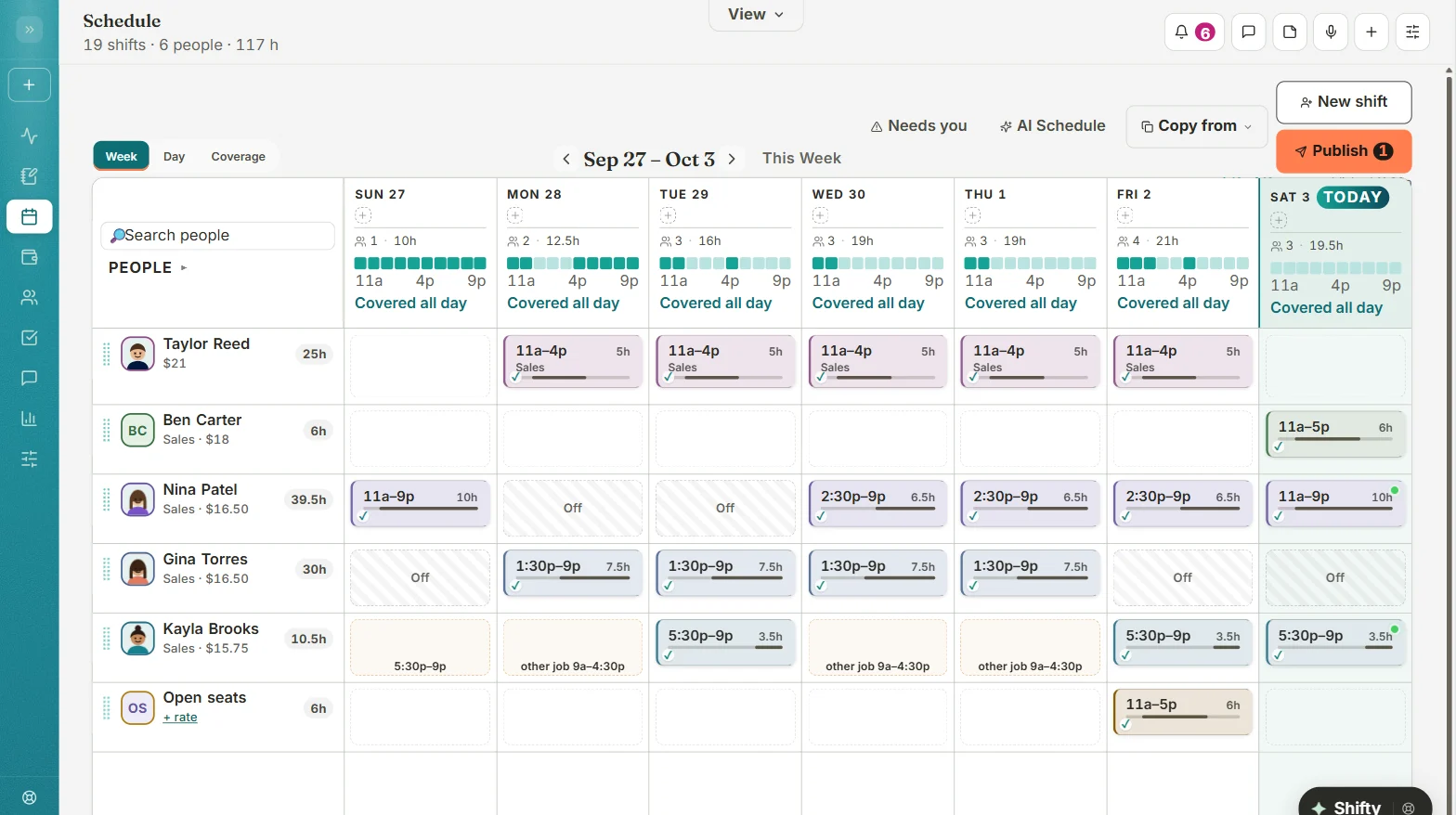
The Teamagogo schedule on a computer: a week of shifts for each person, coverage for every day, and a Publish button
At a glanceTeamagogoHotSchedules
Price on the websiteYes, for everyoneNone. Book a demo
ContractNone24 months on its free-year offer
Built aroundIndependent shift teamsChains and groups
Why switch

Four reasons to switch from HotSchedules to Teamagogo.

1

See the price without a sales call.

With HotSchedulesThe product page has no prices. The next step is “Book a demo,” a form that asks your role, phone number and number of locations.

With TeamagogoPrices are on our website for everyone. Free for up to 10 people at one location, then $29 a month per location on Basic, however many people clock in, or $69 to $79 on All-In. No card to start.

2

No two-year strings.

With HotSchedulesThe “1 year of HotSchedules on us” offer requires a 24-month HotSchedules contract plus a Fourth Payroll contract, and you still pay payroll implementation and processing costs.

With TeamagogoNo contract. Keep ADP RUN, Gusto, QuickBooks Online or Paychex Flex. We hand them a clean, signed-off file.

3

AI that shows its work.

With HotSchedulesHotSchedules says it builds schedules “using real sales and labor data” from your POS.

With TeamagogoShifty drafts the week around availability, overtime and your rules, and tells you why it picked each person. You decide if it suggests, drafts, or runs the week on its own. Changes to hours or pay are always proposals you confirm.

4

Your crew gets thanked, too.

With TeamagogoShout-outs, points that are never taken away, rewards you choose, Employee of the Week and on-time streaks are part of the app every employee opens.

Side by side

Teamagogo vs HotSchedules, feature by feature.

We kept the rows that matter to a single restaurant or a small group. Where HotSchedules is bigger, we say so further down.

Teamagogo features are checked against the live app. HotSchedules details come from the pages listed under Sources.
What you needTeamagogoHotSchedulesSource
Prices on the websitePostedFree up to 10 people at one location; then $29 Basic, or $69 to $79 All-In, a monthNot listedBook a demo for pricing[1]
Get started without a sales callYesCreate your account from the websiteDemo formAsks role, phone and number of locations[1]
ContractNone24 monthsOn the free-year offer, plus a Fourth Payroll contract[2]
Keep your payroll companyYesExport files for ADP RUN, Gusto, QuickBooks Online and Paychex FlexPromotes Fourth PayrollThe free-year offer needs a Fourth Payroll contract[1] [2]
AI schedulingShiftyDrafts the week with a reason for every pick; you set how far it goesAI forecastingStaffing from sales and labor data[1]
Build and send the week from a phoneYesDrafts until you press Send; only people whose shifts changed are told, with undoMobile access“Mobile access and real-time updates”[1]
Recognition and rewardsBuilt inShout-outs, points, rewards, Employee of the WeekNot listedNot on the HotSchedules product page[1]
Who it's built aroundIndependent shift teamsRestaurants, cafés, bars, retail and more120,000 locationsLogos include Taco Bell, Dunkin', KFC, Pizza Hut, Arby's[1]
Yes includedAdd-on or Paid plan costs extraNot listed not on their public pages
Sources
  1. HotSchedules product page (Fourth): https://www.fourth.com/product/hotschedules (as of Oct 2026)
  2. “Get 1 year of HotSchedules on us” offer terms: https://www.fourth.com/feature/hs-x-payroll (as of Oct 2026)
What your week looks like

Done from your phone, before Sunday dinner.

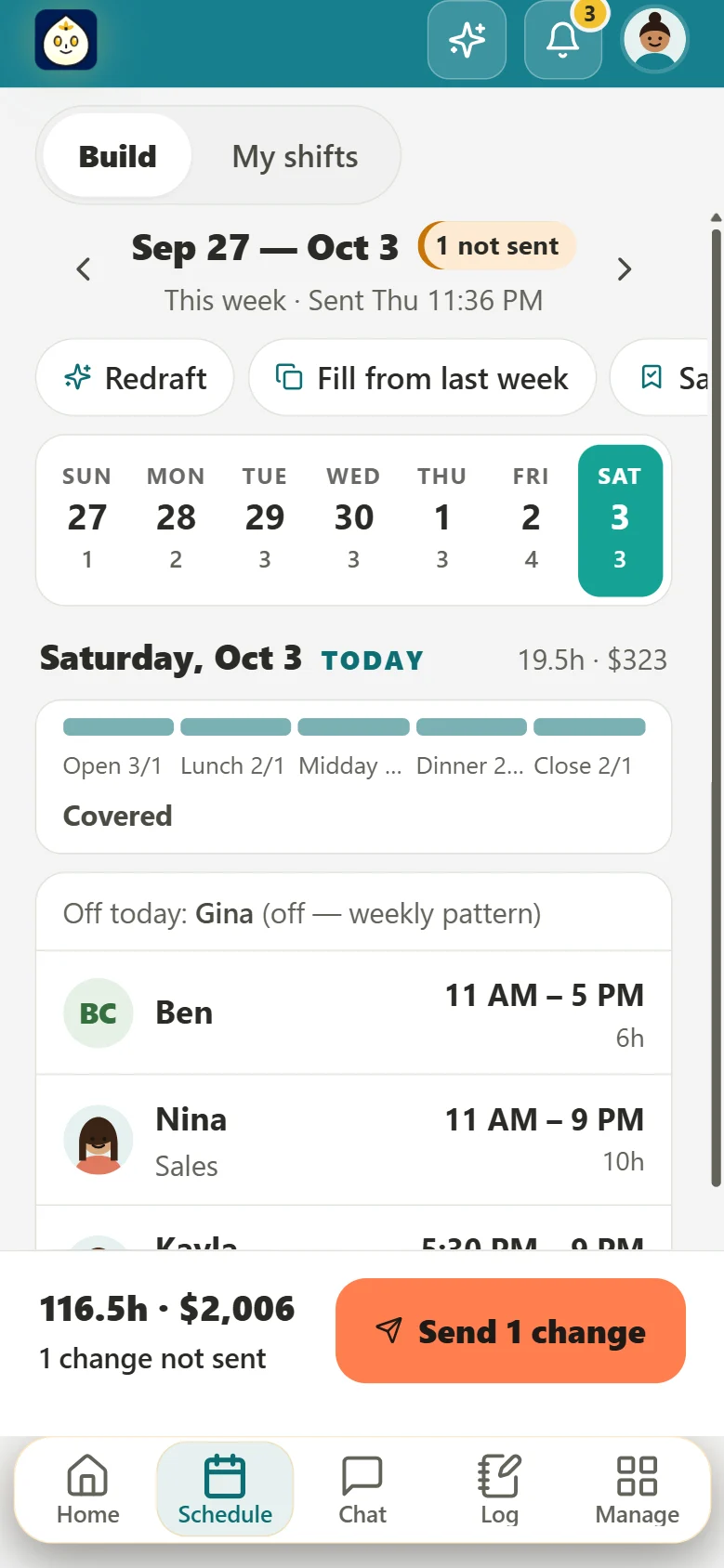
The schedule, built and sent from your phone.

  • Shifty drafts the week around availability, overtime and your rules, with the reason for every pick.
  • You set how far it goes: suggestions only, drafts for you, or the whole week sent on its own when nothing breaks your rules.
  • Drafts stay private until you press Send. Only the people whose shifts changed get an alert, and you get about a minute to undo.
Building the week on a phone in Teamagogo: each day's coverage, who's on, the week's hours and cost, and a Send button

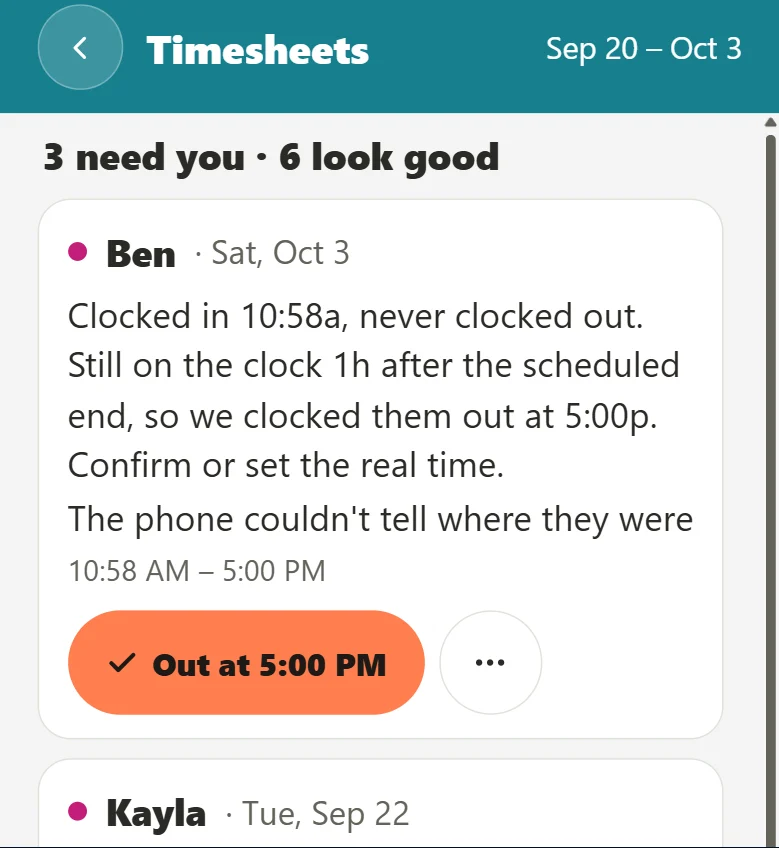
Timesheets that find their own problems.

  • Missed punches, long shifts with no break, overtime creeping up: flagged, each with a one-tap fix.
  • Employees sign off on their week from their phone, or tell you what's wrong, before payroll.
  • Breaks follow your state, including California sign-off, meal waivers and premiums.
Teamagogo timesheets on a phone: a missed clock-out explained in plain words, with the fix one tap away
  • Clock-in spot by address or pin, with an optional photo
  • Shared tablet with PINs for the back room
  • Offline punches keep the real tap time
  • English, Spanish or Portuguese, picked by each person
Recognition, built in

People stay where their work gets noticed.

HotSchedules is built to control labor across many locations. Teamagogo adds the part a small team feels every day: thanks that everyone sees.

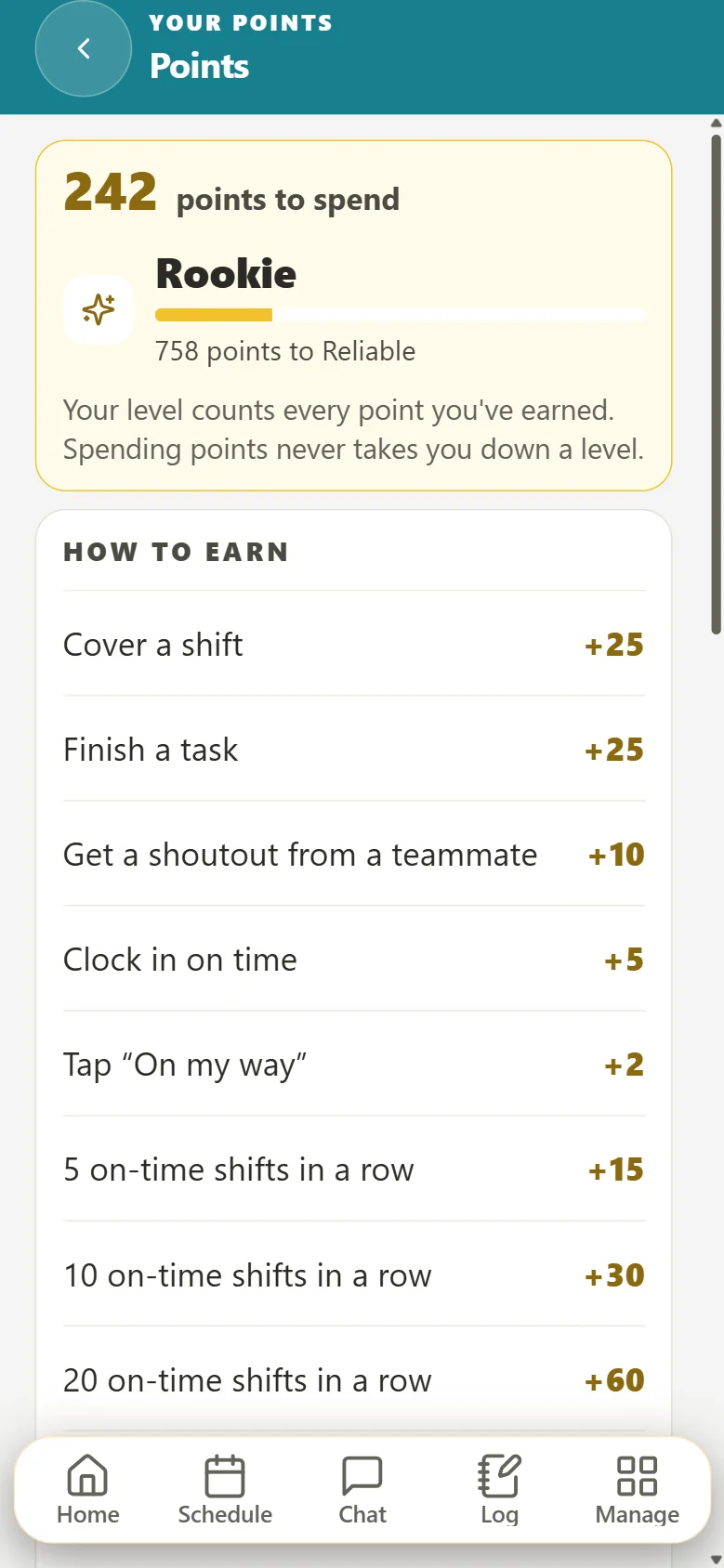
  • Shout-outs from anyone, landing on their phone in gold
  • Points you control, never taken away, spent on rewards you choose
  • Employee of the Week and on-time streaks on everyone's Home
Points in Teamagogo on a phone: points to spend, a level with progress, and what earns points, like covering a shift or finishing a task
Switching takes an afternoon

Bring your HotSchedules team over this afternoon.

Teamagogo reads the files HotSchedules already gives you. You see a preview of every person and every punch before anything is saved.

This afternoon

Move in

  1. Staff › Staff List › Export to Excel, save it as CSV, and upload it. Names, phones, emails and jobs come across.
  2. Staff › Punch Records › Reports › HS Payroll Report, saved as CSV, brings your past timecards.
  3. Add time-off balances from a spreadsheet, or snap a photo of a paper schedule.
Tomorrow

Your team joins

Send one link. Employees add Teamagogo to their phone's home screen, pick their language, turn on alerts and clock in.

End of week one

First payday

Hours are signed off, problems are fixed, and the file for your payroll company is ready to download.

Questions

Teamagogo vs HotSchedules: questions owners ask.

Is Teamagogo a good HotSchedules alternative for one restaurant?

Yes. Teamagogo is built for independent restaurants, cafés, bars and shops with hourly teams. You get scheduling, a time clock, timesheets, team chat and recognition in one app, at one price per location, with no demo call and no contract.

Can I bring my data over from HotSchedules?

Yes. Export your Staff List and the HS Payroll Report from HotSchedules, save them as CSV, and upload them to Teamagogo's Move-in. You see a preview of every person and timecard before anything is saved. Time-off balances come from a spreadsheet.

Do I have to change payroll companies?

No. Teamagogo builds export files for ADP RUN, Gusto, QuickBooks Online and Paychex Flex in the format each one expects. You upload the file the way you do today.

How much does Teamagogo cost?

Free in any month 10 or fewer people work at one location. Otherwise Basic is a flat $29 per location per month however many people clock in, and All-In is $69 per location per month for up to 50 people at a location and $79 for 51 to 150. You are billed on the people who clocked in, never your list, and a month with 10 or fewer workers is free automatically. Annual billing gets you two months free, locations 4 to 10 are 30% off and 11 or more are 50% off, and over 150 people we quote it. No per-user fees, no add-ons, no minimums, no contract and no card to start.

Is there an app to download?

Teamagogo installs from our website onto any phone's home screen, with its own icon and alerts. It works the same on iPhone and Android. There's no App Store or Google Play download yet.

Leave the demo calls to the chains. Make the schedule one less thing to think about.

Free for up to 10 people. No card, no contract.

Create your account

Create your account
Already have an account? Log in

Competitor details from their public websites as of October 2026. Trademarks belong to their owners. Teamagogo is not affiliated with Fourth Enterprises or HotSchedules.