Teamagogo vs Homebase

The Homebase alternative with nothing sold on the side.

Homebase prices per location too. Then task lists, tip pooling and payroll are sold on top. Teamagogo is one price per location, billed on the people who actually worked, with no add-ons.

No contractNo card to startFree for up to 10 people
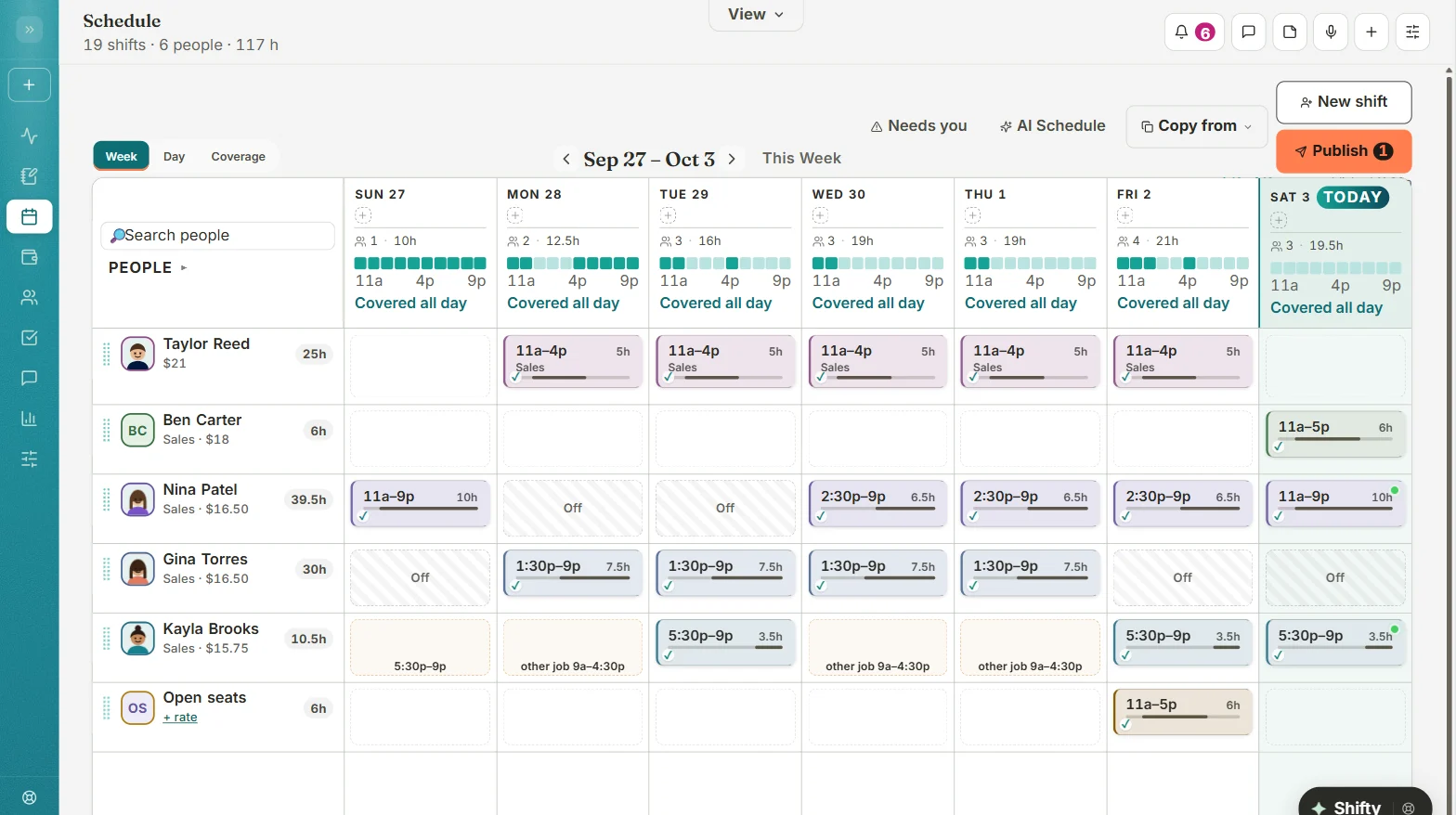
The Teamagogo schedule on a computer: a week of shifts for each person, coverage for every day, and a Publish button
At a glanceTeamagogoHomebase
Task listsIncluded$13 a month add-on
Tip poolingIncluded$25 a month add-on
Free-plan timesheetsKept, never deletedStored 90 days
Why switch

Four reasons to switch from Homebase to Teamagogo.

1

Tasks and tip pooling come with it.

With HomebaseTask Manager is a $13 a month add-on per location. Tip Manager is $25 a month per location.

With TeamagogoTasks with photo proof, opening and closing checklists, recurring duties and tip pooling are part of the app. No add-ons.

2

Your records don't expire.

With HomebaseOn the free Basic plan, timesheets are stored for up to 90 days.

With TeamagogoRecords are corrected or voided, never deleted. The original punch is locked, and every edit keeps who, when and why.

3

AI that shows its work.

With HomebaseThe AI Scheduling Assistant starts on the Plus plan, $70 a month per location.

With TeamagogoShifty drafts the week and gives the reason for every pick: available, hours so far, overtime risk, trained. You decide if it suggests, drafts, or runs the week on its own. Changes to hours or pay are always proposals.

4

Thanks that lands in gold.

With TeamagogoShout-outs, points you control that are never taken away, rewards you choose, Employee of the Week and on-time streaks. Recognition is part of every employee's Home screen.

Side by side

Teamagogo vs Homebase, feature by feature.

Homebase and Teamagogo both price per location. The difference is what's inside the price.

Teamagogo features are checked against the live app. Homebase details come from the pages listed under Sources.
What you needTeamagogoHomebaseSource
Pricing modelFlat, per locationBilled on people who clocked in; no add-onsPer location$0, $30, $70 or $120 a month, plus add-ons[1]
Free planBasicFree for up to 10 people at one locationBasicOne location, up to 10 employees[1]
Task lists and checklistsIncludedPhoto proof, checklists, recurring dutiesAdd-onTask Manager, $13 a month per location[1]
Tip poolingIncludedEnter the day's pooled tips and split themAdd-onTip Manager, $25 a month per location; pulls tips from your POS[1]
Timesheet historyKeptCorrected or voided, never deleted90 days on Basic4+ years on paid plans[1]
AI schedulingShiftyA reason for every pick; you set how far it goesPaid planPlus and up, from $70 a month per location[1]
Custom manager permissions50 permissionsPay stays private to who you choosePaid planPlus and up[1]
PayrollKeep yoursExport files for ADP RUN, Gusto, QuickBooks Online and Paychex FlexSells its own$49 a month plus $6 per employee paid; integrations also offered[1]
Yes includedAdd-on or Paid plan costs extraNot listed not on their public pages
Sources
  1. Homebase pricing page: https://www.joinhomebase.com/pricing (as of Oct 2026)
What your week looks like

Done from your phone, before Sunday dinner.

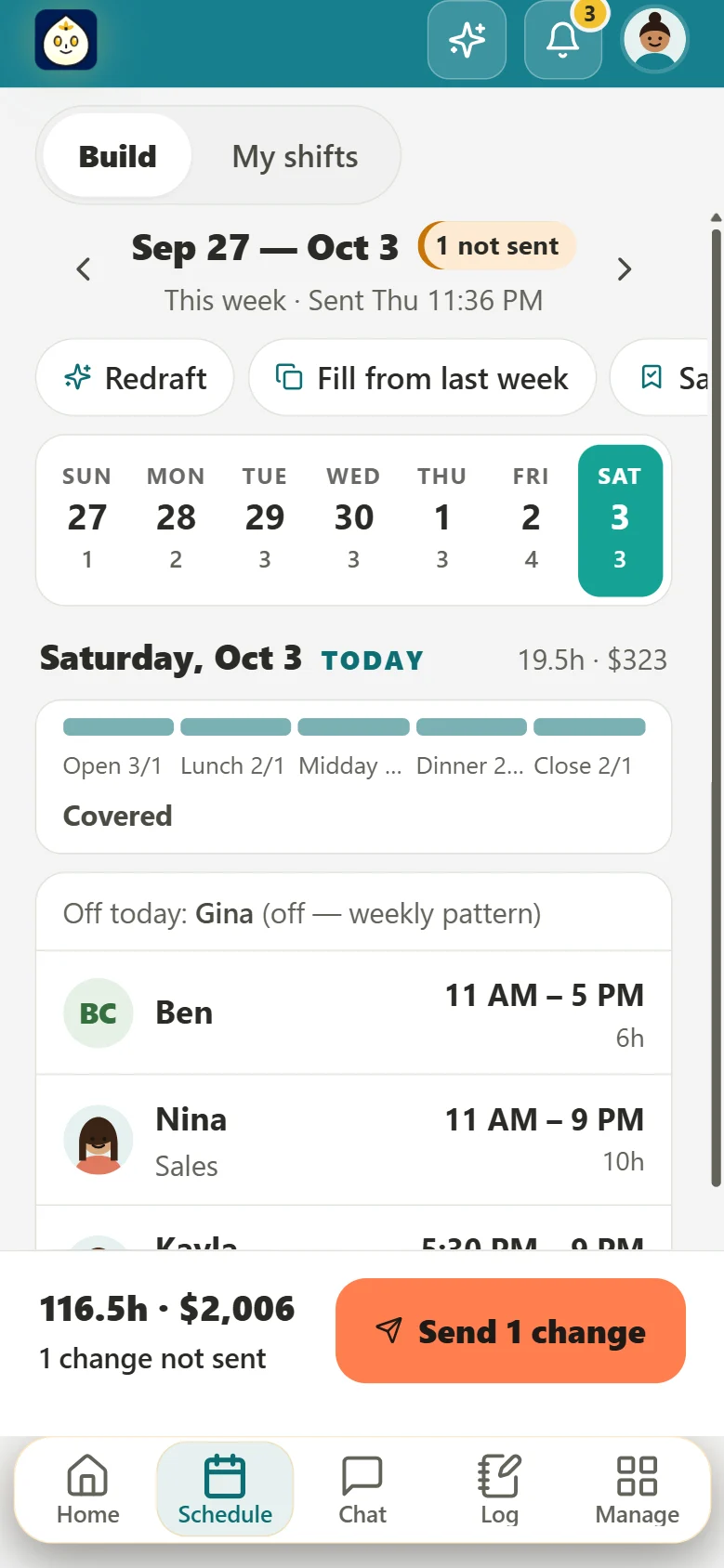
The schedule, built and sent from your phone.

  • Shifty drafts the week around availability, overtime and your rules, with the reason for every pick.
  • You set how far it goes: suggestions only, drafts for you, or the whole week sent on its own when nothing breaks your rules.
  • Drafts stay private until you press Send. Only the people whose shifts changed get an alert, and you get about a minute to undo.
Building the week on a phone in Teamagogo: each day's coverage, who's on, the week's hours and cost, and a Send button

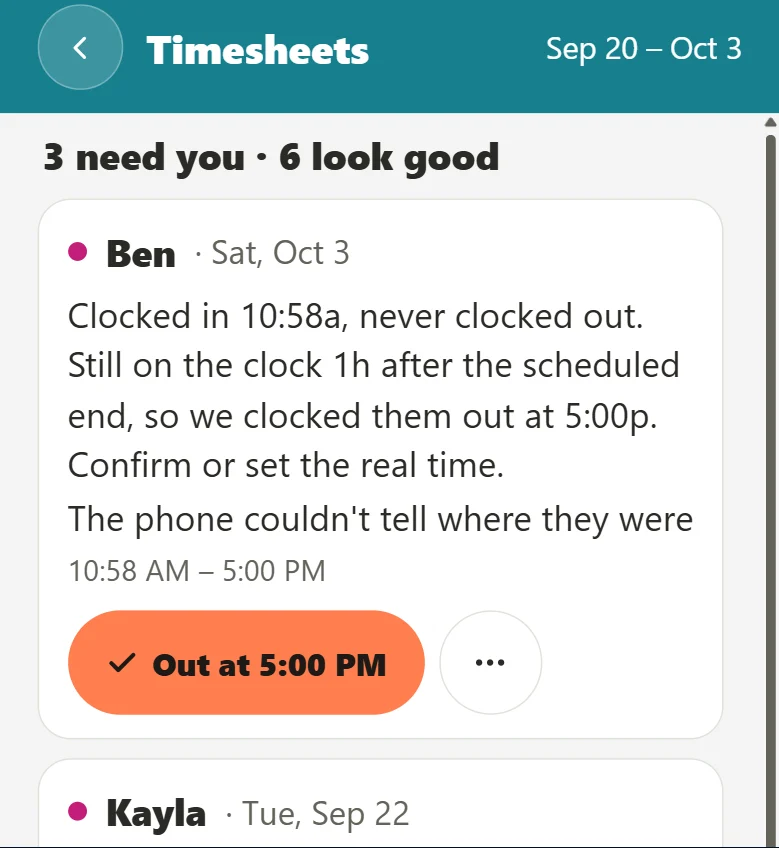
Timesheets that find their own problems.

  • Missed punches, long shifts with no break, overtime creeping up: flagged, each with a one-tap fix.
  • Employees sign off on their week from their phone, or tell you what's wrong, before payroll.
  • Breaks follow your state, including California sign-off, meal waivers and premiums.
Teamagogo timesheets on a phone: a missed clock-out explained in plain words, with the fix one tap away
  • Clock-in spot by address or pin, with an optional photo
  • Shared tablet with PINs for the back room
  • Offline punches keep the real tap time
  • English, Spanish or Portuguese, picked by each person
Recognition, built in

People stay where their work gets noticed.

Homebase is a solid scheduling tool. Teamagogo makes thanks part of the workday too, so good shifts don't go by without a word.

  • Shout-outs from anyone, landing on their phone in gold
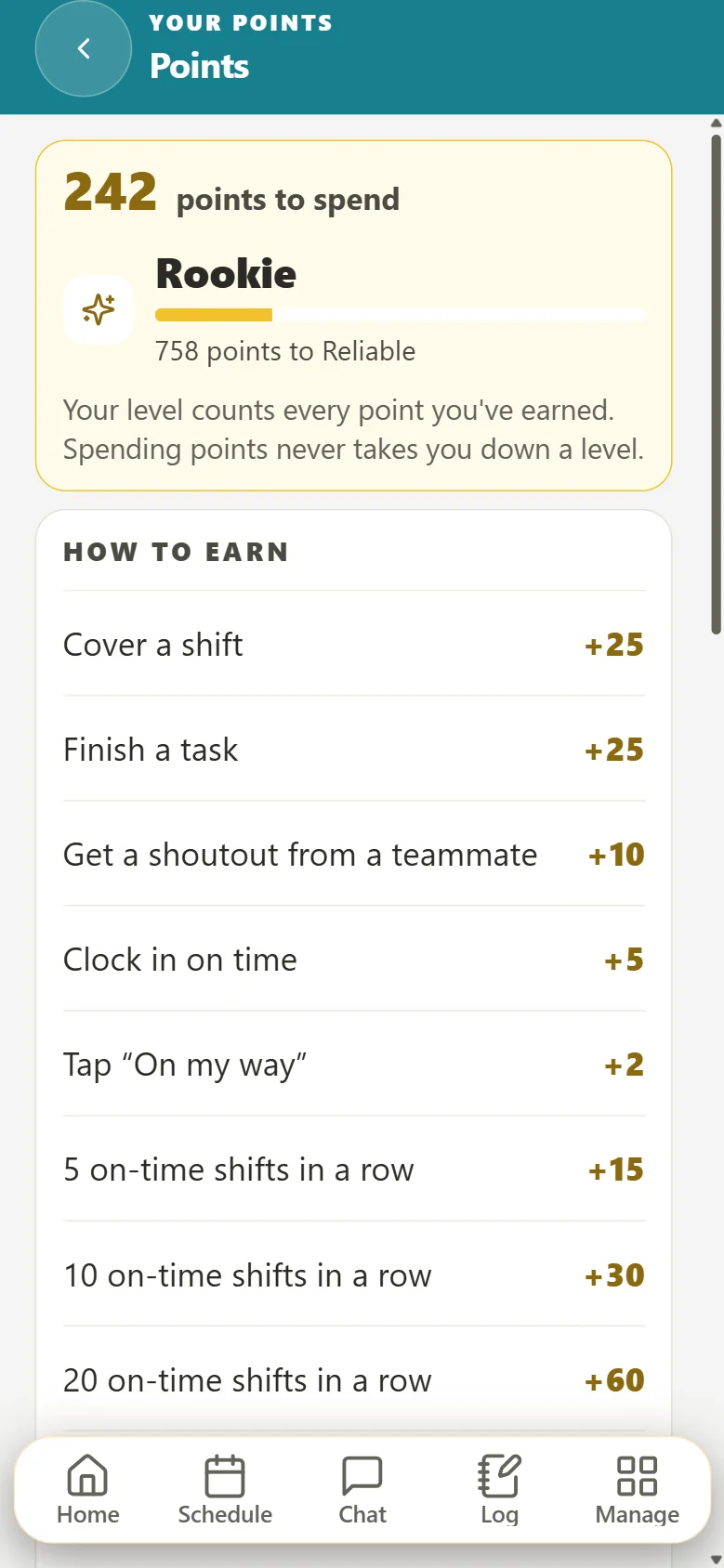
  • Points you control, never taken away, spent on rewards you choose
  • Employee of the Week and on-time streaks on everyone's Home
Points in Teamagogo on a phone: points to spend, a level with progress, and what earns points, like covering a shift or finishing a task
Switching takes an afternoon

Bring your Homebase team over this afternoon.

Homebase is one of the apps Teamagogo's Move-in reads directly. You see a preview of everything before it's saved.

This afternoon

Move in

  1. Download your employee list and past timesheets from Homebase as CSV files.
  2. Upload them to Teamagogo's Move-in and pick Homebase. Names, punches and hours line up in a preview.
  3. Add time-off balances, or snap a photo of a paper schedule to start next week.
Tomorrow

Your team joins

Send one link. Employees add Teamagogo to their phone's home screen, pick their language, turn on alerts and clock in.

End of week one

First payday

Hours are signed off, problems are fixed, and the file for your payroll company is ready to download.

Questions

Teamagogo vs Homebase: questions owners ask.

Is Teamagogo cheaper than Homebase?

For most teams that need tasks or tip pooling, yes. Both have a free tier for up to 10 people at one location. Past that, Homebase's $30 plan is about the same as Teamagogo Basic at a flat $29. But Homebase charges $13 a month for Task Manager and $25 for Tip Manager per location, so $30 plus both is $68, where those are included in Teamagogo Basic. For AI scheduling, Homebase starts at $70 a month per location on Plus, and Teamagogo All-In is $1 less at $69 up to 50 people; above 50 people All-In is $79, which is $9 more than Plus. Basic at $29 already includes Shifty drafts with explanations, and neither Teamagogo plan has add-ons.

Can I import my team from Homebase?

Yes. Teamagogo's Move-in reads Homebase files for your employee list, past timecards and time-off balances. You see a preview before anything is saved, and your team can be clocking in the next day.

Does Teamagogo have AI scheduling like Homebase?

Yes. Shifty drafts the week around availability, overtime and your rules, and shows the reason for each pick. You choose whether it only suggests, drafts for you, or builds and sends the week on its own when nothing breaks your rules.

Do I need Homebase Payroll or another payroll add-on?

No. Teamagogo builds export files for ADP RUN, Gusto, QuickBooks Online and Paychex Flex. Employees sign off on their week first, so the hours you hand payroll are clean.

Is there an app to download?

Teamagogo installs from our website onto any phone's home screen, with its own icon and alerts. It works the same on iPhone and Android. There's no App Store or Google Play download yet.

Everything in one price. Nothing sold on the side.

Free for up to 10 people. No card, no contract.

Create your account

Create your account
Already have an account? Log in

Competitor details from their public websites as of October 2026. Trademarks belong to their owners. Teamagogo is not affiliated with Homebase.